Monday, March 13, 2006

Nuasis NuContact Center 3.0

Here are some press links around the recent release of the Nuasis NuContact Center Version 3.0.

CRM Magazine/Destination CRM
Article headline: All the Talk at VoiceCon: The contact center market continues its migration to IP as vendors make a host of IP-related announcements
http://www.destinationcrm.com/articles/default.asp?ArticleID=5894
NOTE: Nuasis spoke to writer, Coreen Bailor, and the analyst who is quoted, Joe Outlaw. While the article states that there were a "slew of product enhancements, new services and rebranding" at VoiceCon, only Nuasis, Cisco and Avaya are referenced in the article.
Destination CRM is the CRM industry's largest, most successful website which includes the newsletter, CRM eWeekly and the digital version of CRM Magazine, both with 95,000 opt-in subscribers. Readership is mixed between IT management, corporate management and sales/marketing/services.
VoIPLoop: IP Telephony for the Enterprise
Article headline: VoiceCon Spring '06: Interview with Kevin McPartlan, Vice President of Nuasis
NOTE: Before VoiceCon, Nuasis spoke to Alex Dunne, editor of VoIPLoop - the written interview is the link above.
Podcast headline: VoIP Security with Brendan Ziolo of Sipera Systems and IP Contact Center Issues with Kevin McPartlan of Nuasis
NOTE: During VoiceCon, Nuasis spoke to Eric Krapf, VoiceCon conference co-chair and editorial director of BCR Magazine. Eric conducted a podcast interview with Kevin McPartlan.
Blog headline: VoiceCon Conference within a Conference Preview
NOTE - Nuasis talked to Sheila McGee-Smith before VoiceCon. The panel that Sheila discusses in her blog had a standing-room only audience and a standing-room only crowd outside the meeting room who listened to the panel discussion through the room's open door. Panel participants were executives from Avaya, Cisco, Genesys, Nortel and Nuasis' Kevin McPartlan.
VoIPLoop is an online interactive forum for analysts, press, end-users and vendors. It is a CMP Online Publication that was launched in late 2005.
Customer Interaction Solutions/TMCNet
Article headline: Nuasis Says NuContact Center 3.0 Now Available
Article headline: First Coffee - Cingular Announces Video, Nuasis Announces NuContact Center 3.0, Parature Announces Another Customer
NOTE: Also mentioned in this article is Nuasis' newest customer, Southwest Gas.
TMCnet.com is the online site that accompanies TMC's four print publications. TMCnet.com imparts information that helps readers become communications and call center technology advocates who make purchasing decisions and participants who will make these technologies work in any given implementation -- whether it be call centers, the central office or a corporate enterprise. The site currently averages over 7 million page views and reaches on average 650,000 unique visitors per month.
CRMAdvocate - Everything CRM - Read Less. Know More.
TODAY'S NEWS

Nuasis announced the availability of NuContact Center 3.0 software. This release supports agents located anywhere, higher system scalability, and advanced conditional routing based on customer intelligence and business analytics.

NOTE: Nuasis' announcement of 3.0 was the lead story in the March 7 edition of CRMAdvocate.

CRMAdvocate is the definitive and most complete source of information concerning technologies, strategies, and trends for Customer Relationship Management (CRM) and Contact Centers. Providing real-time and on-demand industry news, webcasts, case studies, white papers, research, and product information, CRMAdvocate allows end-users, editors, research analysts, system integrators, consultants and others to stay current on industry trends. Owned by RealMarket, CRMAdvocate is headquartered in Indianapolis, Indiana.
Call Center Magazine/CommWeb and Communications Convergence.com
Article Headline: Nuasis NuContact Center 3.0: The Updated System Supports Remote Agents and Has Greater Scalability
CommWeb and its sister site, CommunicationsConvergence.com (Call Center Magazine online) reach the people who make the business communication technology buying decisions.CommWeb/cConvergence's editorial provides end users and the telephony resellers that serve them the information they need to get their jobs done.

CMP Call Center Network

Sphere: Related Content

Sunday, March 12, 2006

Splunk Integration with Weblogic


Continuing on a theme, this next installment details a new project to integrate Splunk with Weblogic, the J2EE application server. By now you already know about splunk, so let me say a few words about weblogic. Weblogic is billed as "
The most powerful, reliable release of the world's leading J2EE application server is the ideal foundation for building SOAs." What the heck does this mean? Well, weblogic is a J2EE server which means it follows the standard as formalized and defined by Sun. In a previous insallment, I covered a Splulnk Integration with JBoss, which is another J2EE compliant server. The third leading J2EE server is Websphere from IBM. I spent the better part of last week working directly with IBM on a porting project from Linux on x86 architecture to Linux on IBM's POWER architecture, namely the iSeries and I5/0S (fka AS/400). That project involves a port of JBoss at the moment, but I could see how Websphere, with its native integration to I5/0S and native J2SDK might be a better option for ease of deployment and native compatibility. In summary, there are three major J2EE application servers out there at the moment, in this installment we'll cover integrating splunk with a J2EE server, this time Weblogic.

As part of this project, I'll also cover the upgrade of splunk 1.1 to splunk 1.2. Upgrades are supported as of splunk 1.2 and I've already been contacted by a splunker to verify that I'm clear for launch. Thanks Ariel!

Here's the relevant section of the docs, Updating Prior Versions
. The trick seems to be that the configurations done the etc subdirectory get saved as etc.bak.

Here's a look at the demetri05 machine where I'll be working today:

[root@demetri05 root]# ls -l splunk-*
-rwxrwxr-x 1 root root 24451062 Jan 6 11:05 splunk-Professional-1.1-linux-installer.bin
-rwxrwxr-x 1 root root 23916072 Jan 4 17:10 splunk-Server-1.1-linux-installer.bin
-rw-r--r-- 1 root root 21483701 Mar 7 22:16 splunk-Server-1.2-linux-installer.bin


So, looks like I need to turn on execute bits for the new splunk 1.2 installer.bin. Repeat gripe, I need an RPM for splunk and a fully non-interactive install. Again RPM is *the* standard for Linux so this .bin stuff has got to go.

[root@demetri05 root]# chmod a+x splunk-Server-1.2-linux-installer.bin


So invoking the installer like so:

[root@demetri05 root]# ./splunk-Server-1.2-linux-installer.bin


I'm presented with a license agreement and now asked to specify the target installation directory, I'll keep with /opt.

Now I'm presented with the following information, it looks like the installer has detected my existing install. (One more thing, the server has been stopped prior to this point, not sure if that is required but usually a good idea just to be nice.)

Installation Directory [/opt]:

Info: We found a previous Splunk installation. We will retain all indexed data,
user accounts, Saved and Live Splunks, event type tags, and custom source type
names. The configuration files from the previous installation will be saved in
the directory /opt/etc.bak in case you still need them.


And yes, I still need those config files so I'm glad they will be saved. This will save me a lot of trouble going forward.

I select enter and move on.

I'm presented with a number of options concerning ports to run splunk on and directories to use, I'll keep with the defaults here as I have no reason to do otherwise. One other configuration option is running multiple splunk servers on the same machine side-by-side. If you were to go that route, give some careful thought to port allocations and directory structures as you can easily overwhelm the system ,and its administrator, and cause all types of seemingly weird behavior. Like Professor Griff says, "London England, Consider Yourselves Warned!"

A couple more enters and here we go:

Please wait while Setup installs the Splunk Server on your host.

Installing
0% ______________ 50% ______________ 100%
############


Ahh, the sweet sign of success:

Installation successful. See the README.txt file in your install directory.


Let's take a look at the new install:


[root@demetri05 opt]# ls
customer.xml home ncclogs solipsa.com splunk
[root@demetri05 opt]# cd splunk/
[root@demetri05 splunk]# ls
bin etc etc.bak0 lib openssl README.txt sbin share uninstall var


As we said, there is a bak directory, it's named etc.bak0. This is to allow for an upgrade without destroying my initial config. Let's look for config files.

[root@demetri05 splunk]# find etc.bak0/ -name config.xml
etc.bak0/modules/historyprocessor/config.xml
etc.bak0/modules/tailingprocessor/config.xml
etc.bak0/modules/fifoInput/config.xml
etc.bak0/modules/statprocessor/config.xml
etc.bak0/modules/directorymonitor/config.xml


I'm tempted to copy them over to the real etc for preservation but unsure whether there have been any other config file format changes. One file I worked with last time was modules/tailingprocessor/config.xml. Lets see a diff against the new file. So the diff is fairly large and mostly due to a syslog-ng integration I've done unrelated to JBoss or Weblogic. Otherwise, the diff looks okay at first blush. I'll try copying this file over to the new install, making a backup of the v1.2 config.xml for safekeeping.

[root@demetri05 splunk]# cp etc/modules/tailingprocessor/config.xml etc/modules/tailingprocessor/config.xml.orig
[root@demetri05 splunk]# cp etc.bak0/modules/tailingprocessor/config.xml etc/modules/tailingprocessor/config.xml
cp: overwrite `etc/modules/tailingprocessor/config.xml'? y


Okay, that's done. Let's take another look at the preserved etc.bak0 directory to see if any other files should be copied over. I've found this file, which looks interesting.

etc.bak0/custom-typers/weblogic.typer.xml


There's also one in the current install's etc directory. What's the diff?

Huge, again. I'll keep the new one and hope that someone has made some improvements to the typing.

So, I'll now try starting up the new server for the first time. If this doesn't work, my plan is to backout the config.xml change to the tailingprocessor and start again.

The moment of truth:

[root@demetri05 splunk]# /etc/init.d/splunk start
== Checking prerequisites...
Version is Splunk Server
Checking http port [8000]: open
Checking https port [8001]: open
Checking mgmt port [8089]: open
Checking search port [9099]: open
== All checks passed
Starting splunkd [ OK ]


Success!

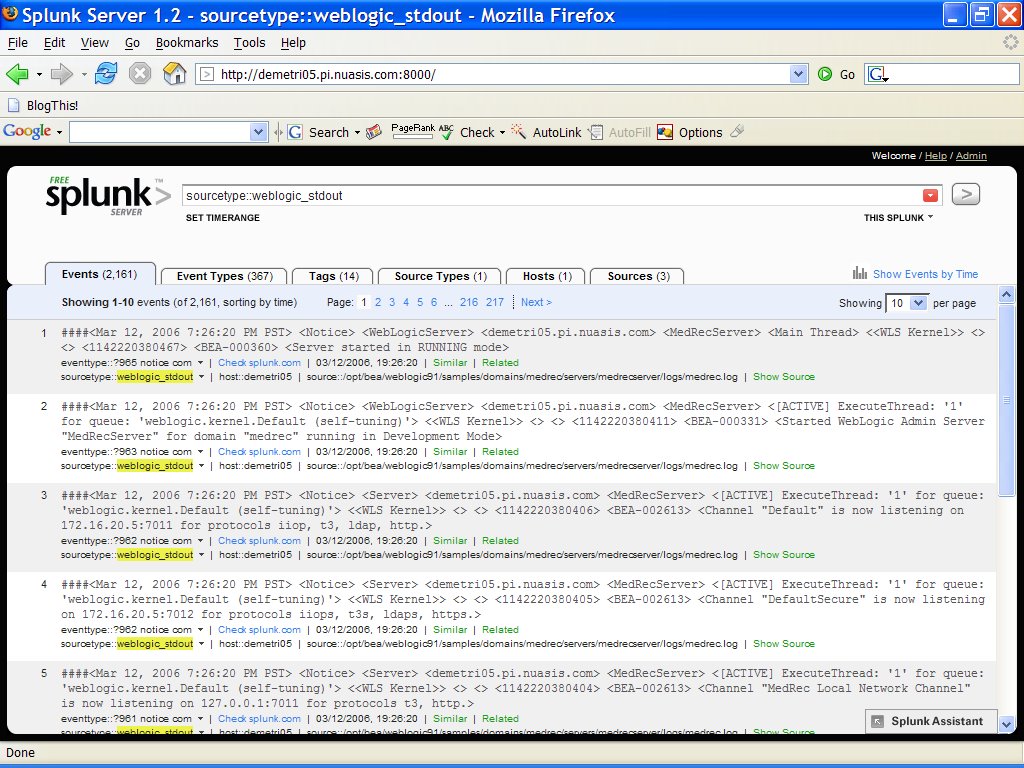
Now were cooking with fire. Here's the first look at a fully working new 1.2 front end.

Weblogic is available for download from the BEA site here:

12/16/2005. WebLogic Server 9.1

I had to create a user account and password and say that I was downloading Weblogic for an eval in order to proceed. I've selected the binary for Red Hat Enterprise Linux 3/4 and am now in the process of downloading it. It's about 350 MB of installer so either use a fat pipe or be prepared to wait.

Here are the install instructions for Weblogic Server 9.1.

Installation Guide


Reviewing the docs, Weblogic has a console mode installer for UNIX systems. I'll use that.

[root@demetri05 root]# chmod a+x server910_linux32.bin
[root@demetri05 root]# ./server910_linux32.bin
My first change was to move bea home from /root/bea to /opt/bea.

I then selected complete install.

I let the installer put down the Mercury profiling tool, though I don't plan to use it.

The product installation directory was "/opt/bea/weblogic91."

Here it goes:

<---------------------------------------------- BEA Installer - BEA Products ---------------------------------------------->

Installing files..

0% 25% 50% 75% 100%
[------------|------------|------------|------------]
[********


So, at the end of this process, Weblogic is installed under /opt/bea/weblogic. Great. Now, how do I start this sucker? The docs are silent on the matter on that pointing to a quickstart launcher that requires X. Okay, so now what.

Aha, here we go:

Starting an Administration Server with a Startup Script

So, I guess I need to use the Weblogic Scripting Tool or WLST.

I found a default template called medrec that I just started playing with.

Here's how I started it:

[root@demetri05 bin]# cd /opt/bea/weblogic91/samples/domains/medrec/bin
[root@demetri05 bin]# ./startWebLogic.sh

Let's configure Splunk's tailing log file processor to grab the log files for this weblogic domain.

Again, I editted /opt/splunk/etc/modules/tailingprocessor/config.xml and added a new stanza for the weblogic log file located at /opt/bea/weblogic91/samples/domains/medrec/servers/MedRecServer/logs/MedRecServer.log.

I found one more default server that Weblogic installed and added its log file to the config as well. That log file was:

/opt/bea/weblogic91/samples/domains/wl_server/servers/examplesServer/logs/wl_server.log

Both now appear on my Splunk front end GUI page which means this is working!

Now, I'm going into the Splunk GUI and uploading these event types to SplunkBase by clicking on the check splunk.com links.

Now that some of these logs are up on SplunkBase, you can start to see how this whole thing fits together. Here's an example type I've just uploaded:

SP-CAAACM6

For this example, I added two tags to this event. JDBC and MedRecServer.

Let's try searches for those two tags:


MedRecServer


JDBC

Cool.

Right now I'm just scanning through the EventTypes on my local Splunk server. I've got them sorted in reverse frequency so that I'm uploading the rarest event types first.

This time around, I've noticed two things about the EventTyping. First, Splunk detected this log file as Type weblogic_stdout. Second, Splunk seems to be auto-tagging. This is really cool. Saves me some typing later.

The other thing I'm doing is hanging some "meat" on each event type description. For now, its just the standard, weblogic log, see bea webpage for more infor kind of message. Later, folks with more detailed knowledge about each of these can come online and put some better information around each event type. For now, though, this is a good header.

So I've uploaded the bulk of my events to splunk base and editted them to taste.

I'm now up around 200 events submitted with the majority of those containing some significant detail.

Here's the latest:

http://www.splunk.com/event/SP-CAAACPW

There you have it, Splunk Integration With Weblogic

Sphere: Related Content

Friday, March 10, 2006

iMedia Connection: Mobile Video: Present and Future

Here's an article I found as part of my research into the mobile ASP space. It sounds promising, doesn't it?

iMedia Connection: Mobile Video: Present and Future

Sphere: Related Content

Monday, March 06, 2006

Open Season On Open Source?

There's an interesting article in BusinessWeek about the future of Open Source after Oracle's recent maneuvers with Innodb, MySQL, and JBoss. The cool thing is that the open source project the writer picked to anaylyze is none other than Nagios, one of my favorite tools.

Open Season On Open Source?

See also my earlier blog post about integrating Splunk with JBoss and the reference at the end to the Oracle situation.

Splunk Integration with JBoss

When I contacted Ethan Galstad to notify him of the article, he was kind enough to let me know that it is posted on the Nagios site under the propoganda section here:

Nagios Propaganda

He also posted a reply to a blog on InfoWorld here:

InfoWorld Blog

I tend to agree with Ethan on his main point that the Open Source community behind projects like Nagios and a corporation seeking to "buy in" to such a community have differing objectives and motivations. What still remains unclear to me, however, is to what extent dangling money in front of successful Open Source leaders will lead to a bastardization of the community. I'm hopeful that folks like Ethan will continue to show resolve and resist the temptation but I can also understand those who are willing to accept the risks of meddling in order to make a living off their hard work. Time will tell.

Sphere: Related Content